




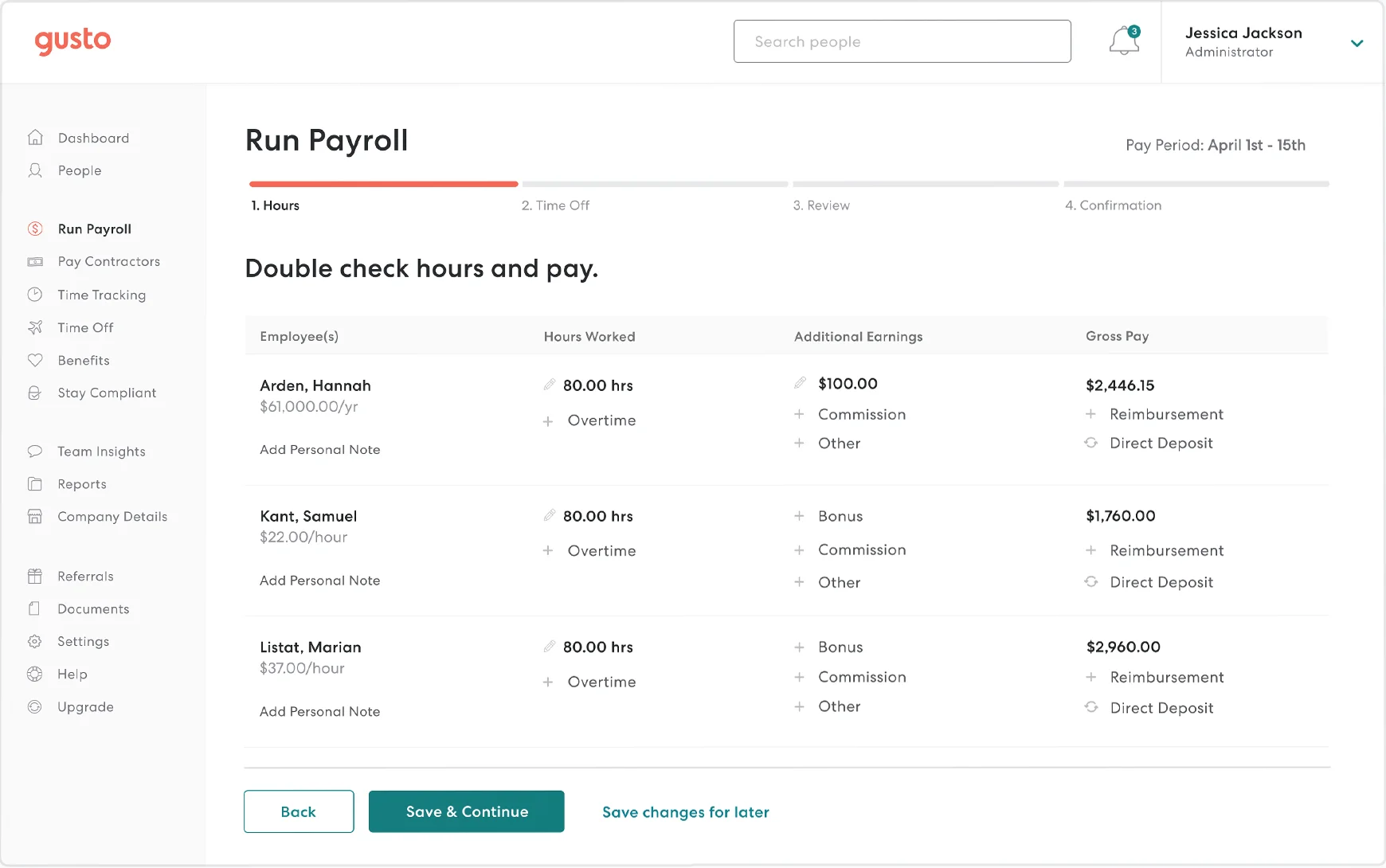

Full-Service Payroll
Unlimited monthly payroll runs with automatic calculation of wages, withholdings and deductions, including off-cycle runs at no extra charge. Employees get lifetime access to paystubs and W-2s through the employee portal.

Automated Payroll Tax Filing
Gusto files and pays federal, state and local payroll taxes and produces W-2 and 1099 forms at year end. Multi-state filing is included from the Plus plan upward.

Contractor Payments
A Contractor Only plan pays domestic contractors on a 4-day schedule and generates 1099 filings, and global contractor payments are available on a per-payment basis.

Instant Pay and Next-Day Payroll
Plus and Premium support next-day direct deposit, and an Instant Pay option lets employees receive earned wages within minutes around the clock.
Tiered Customer Support
All plans include weekday chat and callbacks, 24/7 email and help center access, and after-hours voice AI. A Priority Support add-on and the Premium plan route customers to more experienced payroll and benefits specialists.

Dedicated Service Advisor and HR Experts
Premium customers get a named service advisor, HR expert guidance, migration assistance and compliance resources such as handbook tools and state law updates.
Simple
Single-state small businesses with basic payroll needs

$49/mo
$49/mo base + $6/mo per person
- Single-state payroll
- Unlimited monthly payroll runs
- Automatic federal and state tax filings and payments
- W-2 and 1099 preparation
- Basic PTO management
- Basic support, with Priority Support add-on at $30/mo + $3/mo per person
Plus
Growing teams with employees in more than one state

$80/mo
$80/mo base + $12/mo per person
- Everything in Simple
- Multi-state payroll
- Next-day direct deposit
- Built-in time tracking
- Expanded PTO and team management tools
- Basic support, with Priority Support add-on at $30/mo + $3/mo per person
Premium
Companies that want hands-on support and HR guidance

$180/mo
$180/mo base + $22/mo per person
- Everything in Plus
- Priority Support included
- Dedicated Service Advisor
- Access to certified HR experts
- Performance management and custom reports
- Migration assistance when switching providers

Small Businesses
1-25 EmployeesGusto's strongest fit: first-time payroll runners get free setup, unlimited runs and guided onboarding, and they pay nothing until the first payroll. Simple or Plus with the Priority Support add-on gives faster help without the Premium price.

Mid-Market Companies
26-100 EmployeesMulti-state payroll, time tracking and next-day pay on Plus suit growing teams. Premium's dedicated advisor and HR experts become more valuable here, though per-person fees add up quickly.

Enterprise Companies
100+ EmployeesGusto can run payroll at this size, but it is built for small businesses and lacks the enterprise account management of larger providers. Buyers should confirm reporting depth and escalation paths before committing.

Accountants and Bookkeepers
Any SizeGusto Pro gives accounting firms a partner dashboard, payroll transfer automation and client management tools, which helps them run payroll for many small clients.





Strengths

- Clear support ladder: standard chat and callbacks, a paid Priority Support add-on, then a dedicated service advisor on Premium
- Live chat runs seven days a week, including weekend hours, with 24/7 email and help center access
- HR expert guidance and compliance resources are available on the Premium plan
- Transparent published pricing with month-to-month billing and no long-term contract
- Unlimited payroll runs and automatic tax filings in all 50 states on every paid plan
- Guided migration that Gusto says usually finishes in under a week, with setup fees included
- High review-site satisfaction (4.6 on G2 and Capterra) driven by ease of use
Limitations

- Trustpilot (1.9) and BBB (1.67) reviews repeatedly cite slow or inconsistent support on complex tax and account issues
- Phone support is callback-based and weekday-only, so there is no inbound 24/7 phone line
- Faster support costs extra: Priority Support is a paid add-on below Premium
- Multi-state payroll requires Plus or higher, and per-person fees climb steeply on upper tiers
- The standalone HR Resources add-on closed to new buyers in September 2026, so HR expert access now means upgrading to Premium
- State tax registration fees vary by state and are not included in list pricing
Our Verdict
Gusto earns its place in BizGlocal's Best in Support list for payroll software because of how its support is built. Chat runs seven days a week, email and the help center are always open, voice AI covers after hours, and customers can pay for priority routing or move to Premium for a dedicated service advisor and HR experts. Capterra reviewers rate customer service 4.4 out of 5. Guided migration and free setup also lower the risk of switching for small businesses running payroll for the first time. The evidence is mixed, though. Trustpilot and BBB reviews are strongly negative about slow escalations, template replies and account holds, and TechRadar notes that responses could be faster. Buyers who expect frequent multi-state tax questions or who want reliable escalation should budget for Premium or the Priority Support add-on and test response times during onboarding. Teams that need 24/7 inbound phone support should also look at providers that offer it.
-
 Switching typically takes under seven days
 -
Setup is free and billing starts with the first payroll
-
Premium adds hands-on migration assistance
-
Confirm that your time tracking or POS system is in the directory before you switch.
-
Larger employers should test reporting depth and support escalation at their headcount.
-
Benefits, 401(k) and workers' compensation are priced separately.
-
Mid-year switches need accurate year-to-date payroll history for correct tax filings.
-
Billing is month to month with no long-term contract, active employees are billed only in months they are on payroll, and contractors only in months they are paid.