





Weekly Timesheets
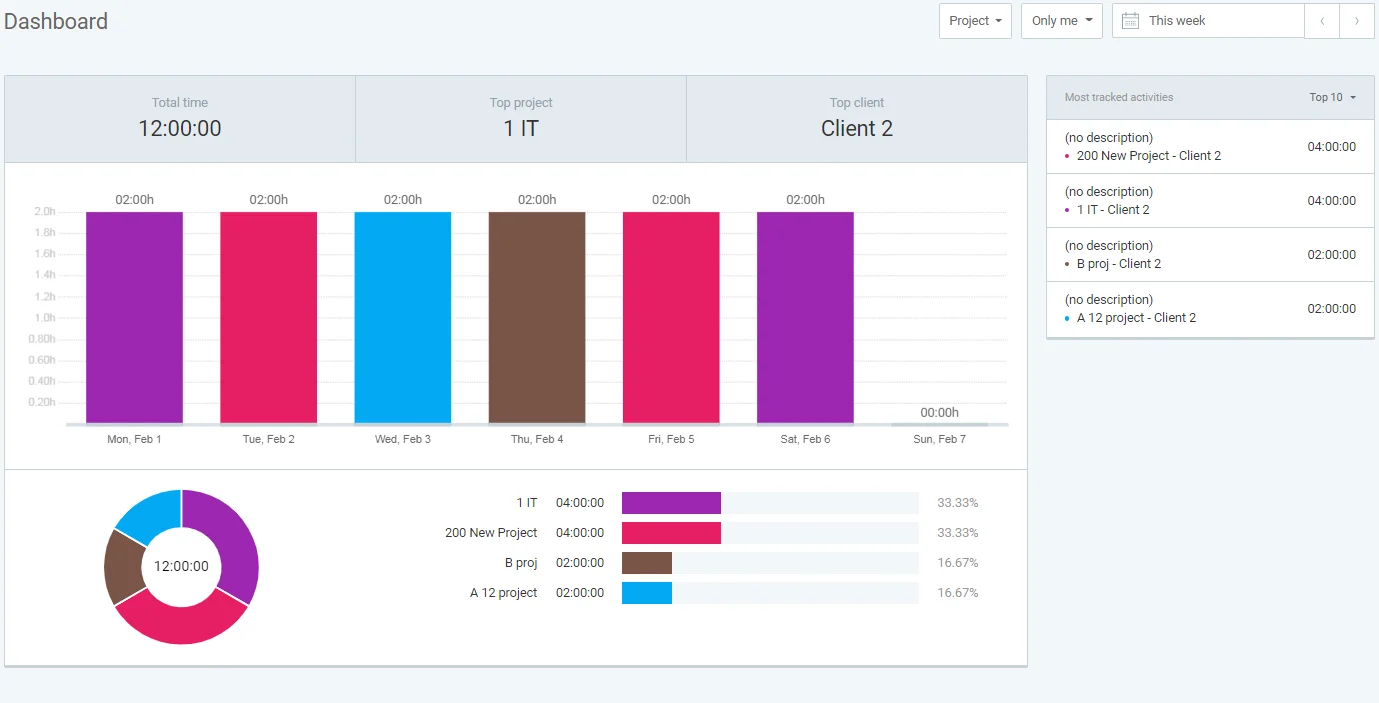
Employees enter hours against projects and tasks in a weekly grid on web, desktop or mobile, and can copy or revise entries through the week. Reports break hours down by person, day and project.

Timer, Calendar and Auto-Tracker
Staff can run a one-click timer, drag time blocks on a calendar or use the desktop auto-tracker to recall which apps and sites they used. Browser extensions add timers inside 100+ web apps.

Timesheet Approvals and Locking
Managers can review, edit and approve submitted timesheets and lock past periods so hours cannot change before payroll or invoicing. Approval workflows are included from the Standard plan.

Kiosk Time Clock
A shared-device kiosk lets hourly workers clock in and out with a PIN, including breaks. Kiosk-only users can be added as reduced-price limited seats.
Time Off, Scheduling and GPS
Standard adds time off policies and balances, while Pro adds shift scheduling, GPS location tracking and activity monitoring for field and remote teams.

Reports, Rates and Exports
Summary, detailed and weekly reports can be filtered and exported to PDF, CSV and Excel, with billable and cost rates for invoicing and payroll totals. Accounting sync is available with QuickBooks and Xero.
Free and Basic
Very small teams (Free, up to 5 users) and small businesses needing admin controls (Basic, unlimited seats)

Free
Free at $0; Basic at $3.99 per seat per month billed annually ($4.99 monthly)
- Unlimited time tracking and projects
- Timer, timesheet and calendar entry
- Basic adds kiosk clock-in and clock-out
- Basic adds bulk editing and time audits
- Basic adds CSV and Excel exports
- Free plan limited to 5 users and one-month report ranges
Standard
Growing teams that approve timesheets and bill clients (roughly 10-100 employees)

$5.49/seat/mo
$5.49 per seat per month billed annually ($6.99 monthly)
- Everything in Basic
- Timesheet approval workflows
- Time off policies and balances
- Invoicing from tracked hours
- QuickBooks integration
- Kiosk-only limited seats at $1.19 per month annually
Pro and Enterprise
Field, remote and larger organizations needing scheduling, GPS or SSO (50+ employees)

Pro at
$7.99
Pro at $7.99 and Enterprise at $11.99 per seat per month billed annually ($9.99 and $14.99 monthly)
- Everything in Standard
- Pro adds scheduling and GPS tracking
- Pro adds expenses, budgets and forecasting
- Pro adds activity monitoring
- Enterprise adds SSO, SCIM provisioning and custom subdomain
- Enterprise adds audit log and a free 30-minute onboarding session

Small Businesses
1-25 EmployeesTeams of up to 5 can start on the free plan, and Basic at $3.99 per seat adds exports and a kiosk at a lower cost than most rivals. The 2026 free plan cuts make the paid Basic tier the realistic starting point for most small companies.

Mid-Market Companies
26-100 EmployeesStandard is the natural fit, adding timesheet approvals, time off and invoicing for about $5.49 per seat. Firms that bill hourly clients get project, rate and budget reporting without moving to an enterprise-priced tool.

Enterprise Companies
100+ EmployeesEnterprise adds SSO, SCIM, audit logs and a custom subdomain at $11.99 per seat, which stays affordable at scale. Large organizations needing deep payroll, labor compliance or complex approval hierarchies may find the feature set lighter than dedicated workforce management suites.

Hourly and Shift-Based Teams Using Kiosks
Any SizeBusinesses with shared-device clock-ins, such as construction crews or retail and service staff, can add kiosk-only limited seats from $0.79 to $2.39 per month on annual billing. This keeps attendance costs low for workers who never need the full app.





Strengths

- Lowest-tier paid plan at $3.99 per seat per month annually, below most mainstream rivals
- Fully published pricing for every tier with no sales call required
- Many entry methods: timer, weekly timesheet, calendar, auto-tracker and kiosk
- Low-cost kiosk-only seats for hourly staff who only clock in and out
- 100+ integrations, including QuickBooks, Xero, Jira and Asana, plus an open API
- 7-day free trial with no credit card required
- SOC 2 Type II and ISO/IEC 27001 security credentials through CAKE.com
Limitations

- Free plan cut to 5 users in 2026, with exports, billable rates and kiosk moved to paid tiers
- Timesheet approvals and time off require at least the Standard plan
- No built-in payroll, so hours must be exported or synced
- Mobile app sync delays and crashes reported by some reviewers
- Reporting and dashboard customization lag some competitors
- No refunds for removed seats, and every active member counts as a paid seat
Our Verdict
Clockify earns its Best in Pricing placement on the strength of transparent, low per-seat rates: $3.99 for Basic, $5.49 for Standard with approvals and time off, and $11.99 for Enterprise with SSO and audit logs on annual billing. For US businesses that need weekly timesheets, approvals, kiosk clock-ins and exports to payroll or accounting, few mainstream tools deliver as much for the money, and reduced-price kiosk seats make hourly-worker attendance especially economical. Buyers should weigh the price advantage against real caveats. The April 2026 free plan changes removed features many teams relied on and drove a wave of negative Trustpilot reviews, approvals require Standard or higher, and payroll must be handled elsewhere. Teams that want polished mobile apps, deep report customization or integrated payroll should compare alternatives, but for cost-conscious teams focused on accurate timesheets, Clockify is a strong value.
-
 A 7-day free trial with no credit card lets you test paid features first
 -
Reviewers report setup in minutes to about 30 minutes for small teams
-
Enterprise upgrades include a free 30-minute tailored onboarding session
-
Because there is no native payroll, confirm your payroll provider can accept Clockify exports or an integration.
-
Very large organizations should test report performance, as some reviewers note slow loading with heavy data.
-
Kiosk-only seats are billed separately, and removed seats are not refunded.
-
Teams switching in should confirm how historical timesheet data from their current tool will be brought over before cutover.
-
Switching from annual to monthly takes effect only after the current term ends.