




Hubstaff logo

Low-Cost Time Tracking And Productivity Monitoring For Distributed Teams

Hubstaff combines time tracking, activity and app/URL monitoring, optional screenshots, GPS job site tracking and automated payroll in one per-seat platform, with paid plans starting at $4.99 per seat per month on annual billing. It is used by more than 140,000 people across remote, hybrid, office and field teams.
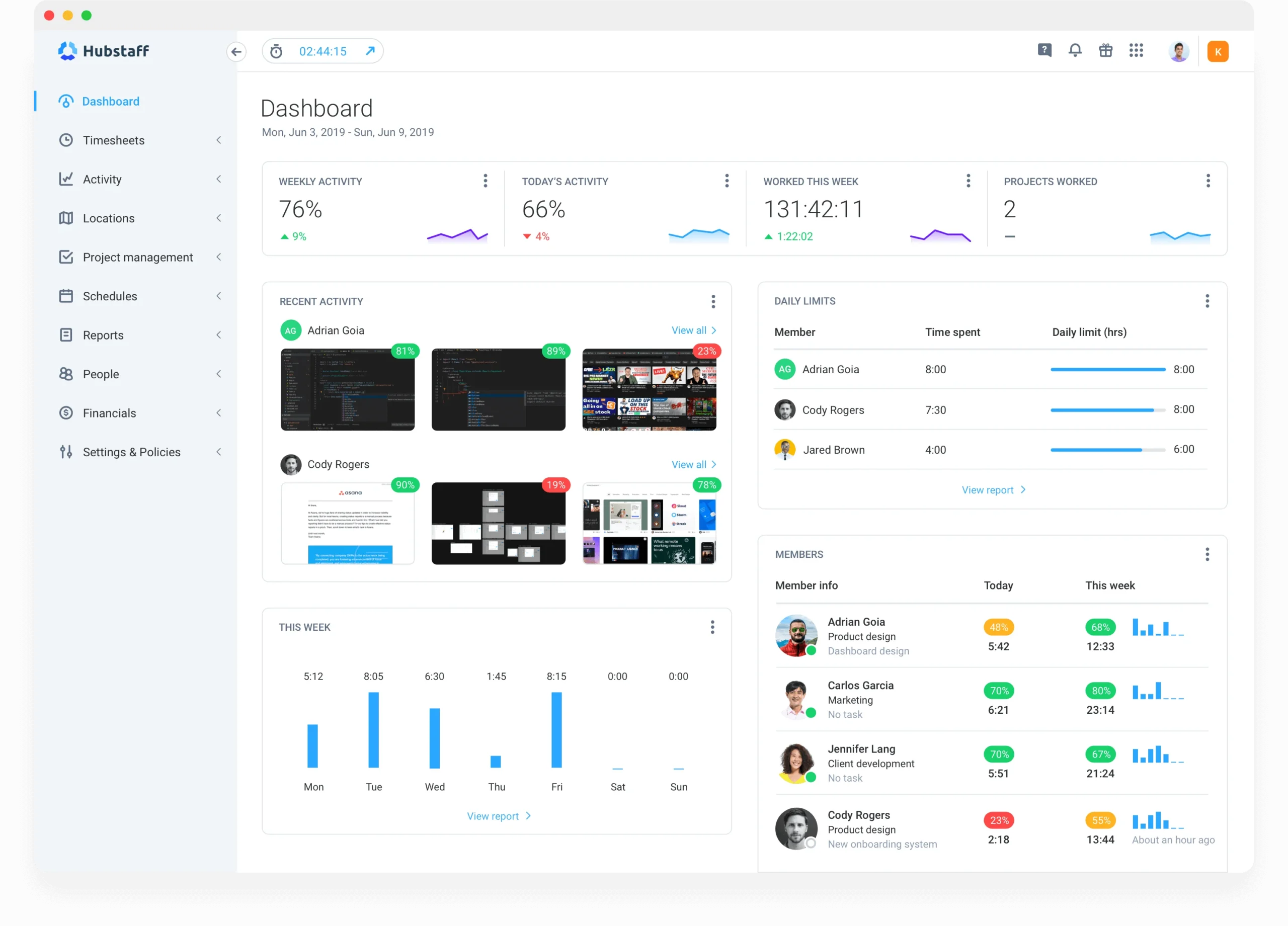
Hubstaff platform dashboard

About Hubstaff

Industry leader in connected fleet operations

Market Position

Established mid-market time tracking and employee monitoring vendor with thousands of reviews across G2 and Capterra.

Innovation Focus

AI unusual activity detection, workforce analytics (Insights) and configurable privacy levels for monitoring.

Core Strengths

Low published per-seat pricing, GPS job sites, and built-in payroll payouts through Wise, PayPal, Payoneer, Deel, Gusto and Bitwage.

Use Cases

Remote team oversight, client billing for agencies and BPOs, field crew attendance, contractor payroll.

Discover Hubstaff’s Complete Employee Monitoring Suite

Core Products & Solutions

Time, activity, location and pay data captured in one per-seat platform
Time Tracking And Automated Timesheets

Time Tracking And Automated Timesheets

Desktop, web and mobile timers log hours against projects and tasks, then roll them into timesheets with approval workflows on the Team plan and above.

Productivity Monitoring

Productivity Monitoring

Activity levels from keyboard and mouse usage, app and URL tracking, idle time detection and optional screenshots that can be blurred, reduced in frequency or disabled by policy.

GPS And Field Tracking

GPS And Field Tracking

Geofenced job sites automatically start and stop timers, while map views show crew locations during shifts; Hubstaff cites roughly 2% battery use per hour on mobile.

Payroll And Payments

Payroll And Payments

Custom hourly or fixed pay rates convert approved hours into payouts through Wise, PayPal, Payoneer, Deel, Gusto or Bitwage, though tax filing still requires a full payroll provider.

Scheduling, Attendance And Time Off

Scheduling, Attendance And Time Off

The Team plan adds shift scheduling, attendance tracking, overtime rules, holidays and time off requests alongside tracked hours.

Insights And Workforce Analytics

Insights And Workforce Analytics

The Insights module adds productivity benchmarks, focus time and AI-flagged unusual activity, available as an add-on at $2.50 per seat per month on lower tiers.

Hubstaff’s Pricing Plans

Pricing Overview

Published per-seat pricing with a 2-seat minimum on paid plans; a 1-seat Free plan and a Grow plan ($7.50 annual, $9.00 monthly) are also offered, plus a 14-day trial and 30-day money-back guarantee

Starter

Small teams that need basic time and activity tracking

$4.99/seat/mo

$4.99/seat/mo billed annually ($7.00 billed monthly)

  • Desktop, web and mobile time tracking
  • Automated timesheets
  • Activity level monitoring
  • 500 screenshots per user per month
  • 500 app and URL records per user per month
  • Invoicing for up to 5 clients
Custom Quote
Get A Quote

Team

Growing companies that need monitoring, scheduling and payroll together

$10.00/seat/mo

$10.00/seat/mo billed annually ($12.00 billed monthly)

  • Everything in Starter and Grow
  • Unlimited screenshots and app/URL tracking
  • Timesheet approvals and payroll automation
  • Scheduling, attendance, overtime and time off
  • Unlimited integrations
  • Hubstaff Tasks included
Custom Quote
Get A Quote

Enterprise

Larger or regulated organizations with security and provisioning needs

Listed at

$25.00/seat/mo

Listed at $25.00/seat/mo; G2 lists Enterprise as custom pricing

  • Everything in Team
  • Single sign-on and SCIM user provisioning
  • HIPAA and SOC 2 Type II compliance support
  • Enterprise deployment options
  • Concierge onboarding
  • Dedicated account representative
Custom Quote
Get A Quote
WHO

Who Is Hubstaff Best For?

Ideal customer segments and business profiles

Small Businesses

1-25 Employees

A strong budget fit: Starter at $4.99 per seat or the $144 per year three-seat bundle covers time and activity tracking for less than most competitors charge.

Mid-Market Companies

26-100 Employees

The Team plan at $10 per seat bundles scheduling, attendance, approvals and payroll, which lets growing firms replace separate timesheet and payout tools.

Enterprise Companies

100+ Employees

Enterprise adds SSO, SCIM, HIPAA and SOC 2 support, though larger buyers should confirm whether pricing is fixed at $25 per seat or negotiated.

Staffing, BPO And Field Services Firms

Any Size

Agencies billing clients by the hour and crews working from job sites benefit most from proof-of-work reports, geofenced clock-ins and global contractor payouts.


Hubstaff’s benefits

Measurable Impact & Benefits

Results reported by named customers in Hubstaff’s published case studies

$4.2M

Saved Over 12 Years

Affordable Staff's reported cumulative savings from using Hubstaff.

80%

Less Management Time

Reduction in management time reported by Affordable Staff.

5 M

Payroll In Under inutes

Slash Staffing cut payroll processing from a full day to minutes.

80

Admin Hours Saved Monthly

Emsisoft's reported monthly reduction in administrative work.

20%

Lower Billing Expenses

Billing cost reduction also reported by Emsisoft.

240 Hours

Saved Per Year

Annual time savings reported by H2L2.

35%

Productivity Improvement

Productivity gain reported by Heeeper.

50%

Less Administrative Overhead

Overhead reduction reported by Wire2Air and TXTImpact.

Hubstaff’s REVIEWS

Hubstaff Real reviews

140,000+ users across remote, hybrid, office and field teams

Our Rating:

4.5/5

Trustpilot reviews
2.0
G2 reviews
4.4
2,309 Reviews
Capterra
4.5
1,613 Reviews
3.0
949 Reviews
Holly P.
The visibility that Hubstaff offers made it incredibly easy
Crispin W.
It brought structure to time tracking across both remote and field based staff
Employee Monitoring Buyer’s Checklist

Employee Monitoring Checklist

What To Compare Before You Buy

Monitoring tools differ sharply in what they capture, how employees can see their own data and how add-ons change the per-seat price. This checklist helps you compare privacy controls, billing rules and payroll features before you commit

Get Your Free Checklist

Enter your email to download instantly

No spam. Instant access. Unsubscribe anytime.

Instant
Download
No
Spam
Free
Forever
Hubstaff BENEFITS

Hubstaff’s Pros & Cons

Balanced evaluation to help you make an informed decision

Strengths

  • Among the lowest published entry prices in the category at $4.99 per seat on annual billing
  • Transparent public price list with a Free plan, 14-day trial and 30-day money-back guarantee
  • Built-in payroll payouts through six providers including Wise, PayPal, Deel and Gusto
  • Geofenced job sites automate clock-ins for field and on-site crews
  • Configurable privacy levels, screenshot blurring and no keystroke, email or webcam capture
  • 35+ integrations across Jira, Asana, ClickUp, QuickBooks, Salesforce and BambooHR
  • Solid ratings on G2 (4.4) and Capterra (4.5) with praise for ease of use

Limitations

  • Real cost rises with add-ons such as Locations, Insights and extra screenshots
  • Every member except Project Viewers is billed, including owners and inactive users
  • Monthly plans do not prorate seat changes and removed users are not refunded
  • Trustpilot score of 2.0 reflects billing and support complaints
  • Screenshots and activity tracking raise employee privacy and consent concerns, including potential HIPAA exposure if sensitive screens are captured
  • Activity scoring can undercount work done in calls or meetings, and some users report syncing delays

Our Verdict

Hubstaff earns its Best in Pricing placement on the strength of a published, low per-seat price list: $4.99 for Starter, $7.50 for Grow and $10.00 for Team on annual billing, plus a single-seat Free plan and a $144 per year three-seat bundle. For small and mid-sized US businesses, the Team plan delivers time tracking, monitoring, scheduling, attendance and payroll payouts at a price that typically undercuts tools like Time Doctor and ActivTrak at comparable tiers. That value depends on reading the billing rules closely. Add-ons, the 2-seat minimum, paid seats for managers and inactive users, and no proration on monthly plans can push costs above the headline rate, and Trustpilot reviewers frequently cite billing confusion. Hubstaff's privacy settings are more considered than many rivals, but companies should still disclose monitoring, obtain consent where state law requires it, and limit screenshots for roles handling sensitive data.

Resources

Resources & Documentation

Detailed materials for deeper evaluation

Pricing Plans

Current plan comparison, trial and money-back terms.

Hubstaff Pricing Guide

Plan-by-plan feature breakdown with add-on prices.

Per-Seat Pricing Explained

Support article on seat minimums, billable roles and proration.

Guiding Principles

Hubstaff's privacy and transparency commitments for monitored employees.

Screenshot Blur Settings

Support guide for blurring screenshots at the organization level.

Payroll Overview

How pay rates, payment providers and automatic payroll work.

Integrations Directory

Full list of 35+ project management, payment and HR integrations.

Customer Stories

Case studies with named customer results and savings.

What to Know

What to Know Before Buying

Key considerations for evaluating Hubstaff
  • A 14-day free trial with no credit card allows a full pilot
  • Concierge onboarding is included only on Enterprise
  • Privacy levels, screenshot frequency and GPS settings should be defined before rollout
  • Grow includes one integration and Team unlocks unlimited integrations, so buyers relying on Jira, Asana, QuickBooks or Gusto together should budget for Team or higher.
  • The platform scales from solo users to enterprise deployments with SSO and SCIM, but screenshot and app/URL caps on Starter and Grow push larger teams toward Team.
  • Add-ons from $1.67 to $3.33 per seat, billable manager and inactive seats, and no proration on monthly plans can raise costs well above the advertised rate.
  • Historical timesheets must be exported from the old tool, and employees need clear notice about what the new monitoring captures before switching.
  • Monthly and annual billing are both available, with annual plans offering the lowest rate, a 30-day money-back guarantee and prorated seat additions on quarterly and yearly terms.

Alternatives

Compare Alternatives

See how Hubstaff stacks up against competitors

Time Doctor lists Basic at $6.70, Standard at $11.70 and Premium at $16.70 per user per month, above Hubstaff's comparable tiers, with video recording on its top plan.

ActivTrak offers a free plan for up to 3 users and paid plans from $10 to $19 per user per month, with a stronger focus on analytics than GPS or payroll.

Get Started

Ready to Get Started?

Get personalized recommendations from top 3 vendors

By submitting, you agree to receive recommendations from verified vendors. No spam, unsubscribe anytime.

Are You a Software Vendor?

List your company and get in front of decision-makers actively searching for solutions.

FAQ’s

Frequently Asked Questions

Common questions about Hubstaff

Hubstaff publishes per-seat pricing: Starter at $4.99, Grow at $7.50 and Team at $10.00 per seat per month on annual billing ($7, $9 and $12 on monthly billing), with Enterprise listed at $25 per seat. A single-seat Free plan and a $144 per year three-seat Small Business Essentials bundle are also available.

Yes, but it covers only one seat, typically the organization owner, with basic time tracking, activity levels and 100 screenshots per month. Adding any team member requires a paid plan with a 2-seat minimum.

Every member except Project Viewers counts as a paid seat, including owners, managers, inactive members and people with tracking disabled.

No. Hubstaff tracks activity levels, apps, URLs and optional screenshots only while the timer runs, and states it does not log keystrokes, monitor email or access webcams.

Hubstaff offers privacy levels, screenshot blurring and employee access to their own data, but employers remain responsible for disclosure and consent under state and federal rules, and screenshots can expose sensitive data in regulated roles.

Yes. Mobile apps support real-time location and geofenced job sites that start and stop timers automatically, with location features tied to the Locations add-on or higher plans.

Hubstaff calculates pay from approved hours and pays team members through Wise, PayPal, Payoneer, Deel, Gusto or Bitwage, but it does not handle payroll tax withholding or filings on its own.

Common alternatives include Time Doctor, ActivTrak, Insightful, Teramind and Clockify, which differ in monitoring depth, free plan limits and per-user price.


