




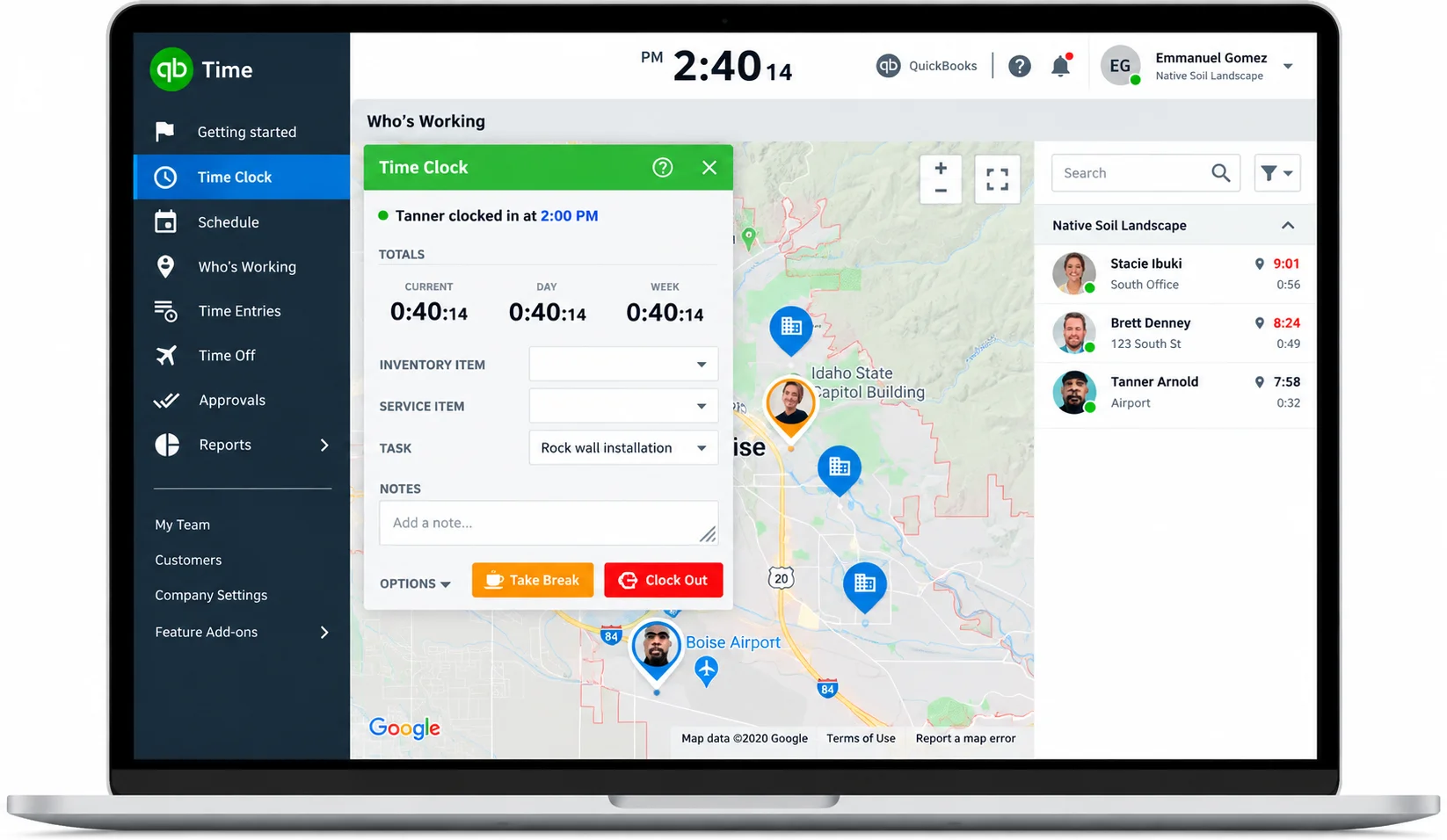

Electronic Timesheets And Approvals
Employees log time by job, customer or service item, and managers review, edit and approve timesheets before they are sent to payroll or invoices.

QuickBooks Workforce Mobile App
The iOS and Android app lets staff clock in and out even without Wi-Fi or signal, view schedules and pay stubs, and attach photos and notes to time entries.

Time Kiosk
A shared tablet clock for on-site teams, so crews can punch in at a job site or shop without individual devices.

GPS And Geofencing
Location points are captured while on the clock, and Elite adds geofence reminders that prompt workers to clock in or out when they arrive at or leave a job site.
Scheduling, Time Off And Overtime Alerts
Managers build and publish shifts, manage time-off requests, and receive alerts before workers reach overtime or scheduling conflicts arise.

Project Tracking And Timesheet Signatures (Elite)
Elite compares budgeted versus actual hours, adds a project activity feed and deadlines, and captures timesheet signatures for client or supervisor sign-off.
Time Premium
Small teams that need timesheets, scheduling and payroll sync

$20/mo
$20/month base + $10/user/month
- Mobile time tracking through the QuickBooks Workforce app
- Timesheet approvals with payroll and invoicing sync
- Time-off management and overtime alerts
- Photo attachments on timesheets
- On-site Time Kiosk
- Unlimited phone and chat support, 1 admin included
Time Elite
Field, construction and project-based teams

$40/mo
$40/month base + $12/user/month
- Everything in Time Premium
- Geofence clock-in and clock-out reminders
- GPS mileage tracking while on the clock
- Project estimates versus actual hours reporting
- Project activity feed and deadlines
- Timesheet signatures, with unlimited phone and chat support
Workforce Elite (Payroll + Time Elite)
Businesses that want payroll, HR and timesheets bundled

$134/mo
$134/month base + $17/employee/month
- Full-service QuickBooks Payroll with tax filing
- Time Elite timesheet features included
- Same-day direct deposit
- Done-for-you payroll setup
- Dedicated HR advisor access
- Tax penalty protection up to $25,000 per year

Small Businesses
1-25 EmployeesA strong fit for QuickBooks Online users who want accurate hourly timesheets and a support team to call, though the $20 or $40 base fee weighs more heavily on very small teams.

Mid-Market Companies
26-100 EmployeesWell suited to multi-crew and multi-location operations that need geofencing, scheduling and job costing with volume per-user rates past 50 employees.

Enterprise Companies
100+ EmployeesUsable at larger headcounts thanks to tiered per-user pricing, but organizations with complex approval chains or non-QuickBooks ERPs may find customization and integrations limited.

Construction And Field Service Contractors
Any SizeElite's geofence reminders, GPS mileage, project budgets and timesheet signatures target job-site crews, and construction is the first industry Intuit highlights.





Strengths

- Unlimited in-house phone and chat support on every plan, including the free trial
- Support scores of 9.3/10 on G2 and 4.8/5 on Capterra, above several direct competitors
- Native sync with QuickBooks Online, Desktop and Payroll removes manual hours entry
- Highly rated mobile app with offline clock-in, pay stub access and photo notes
- Geofencing, GPS mileage and project budget tracking on Elite for field crews
- Published, transparent pricing with a 30-day free trial and no contract required to start
- Very large review base, over 7,000 on Capterra, which lowers evaluation risk
Limitations

- Two-part pricing (base fee plus per user) and the July 2026 per-user increase raise costs for small teams
- Phone and chat support runs Monday to Friday, 6 AM to 6 PM PT, with no weekend coverage
- Some reviewers describe long support chats and inconsistent agent knowledge
- Geofencing, mileage and project tracking are locked to the pricier Elite tier
- Users report occasional sync issues, app crashes in the field and time-off approval errors
- Limited customization and single-level approvals for complex workflows, and fewer non-QuickBooks integrations
Our Verdict
QuickBooks Time earns its Best in Support placement on the strength of unlimited in-house phone and chat help on every plan, plus support sub-scores of 9.3 out of 10 on G2 and 4.8 out of 5 on Capterra across thousands of reviews. For businesses already running QuickBooks Online and Payroll, it offers a well-supported path from mobile clock-in to approved timesheet to paycheck, and Elite adds the geofencing and project tracking that construction and field teams need. The support story is not uniform, however. Coverage is weekday only, FitSmallBusiness rates support as inconsistent, some G2 and TrustRadius reviewers describe long waits and unresolved tickets, and Intuit's 17% workforce reduction in 2026 is worth watching for service impact. Pricing has also risen, so very small teams or businesses outside the QuickBooks ecosystem should compare lower-cost options such as Homebase or Buddy Punch before committing.
-
 30-day free trial with no credit card or contract required
 -
Employees, jobs and customers import from QuickBooks Online or Desktop
-
Geofences, approvals and overtime rules need configuring before the first pay run
-
Intuit's Elite page lists an active QuickBooks Online account as a requirement for its advertised offer, so confirm eligibility if you run other accounting software.
-
Large organizations should test multi-level approvals and reporting depth, which reviewers cite as limited.
-
A QuickBooks Online or Payroll subscription, if not already in place, adds separate cost.
-
Historical timesheet data from other tools generally needs a manual or CSV import.
-
Prices can change, as the July 2026 per-user increase shows, so lock in rates when you sign up.