




Time Doctor logo

Workforce Analytics And Time Tracking With 24/7 Support On Paid Tiers

Time Doctor tracks work time, activity levels, app and website usage and optional screenshots for remote, hybrid and in-office teams, then feeds approved hours into payroll. Standard and Premium plans add live chat, email and callback support, and Premium accounts with 50 or more users get a dedicated success manager.
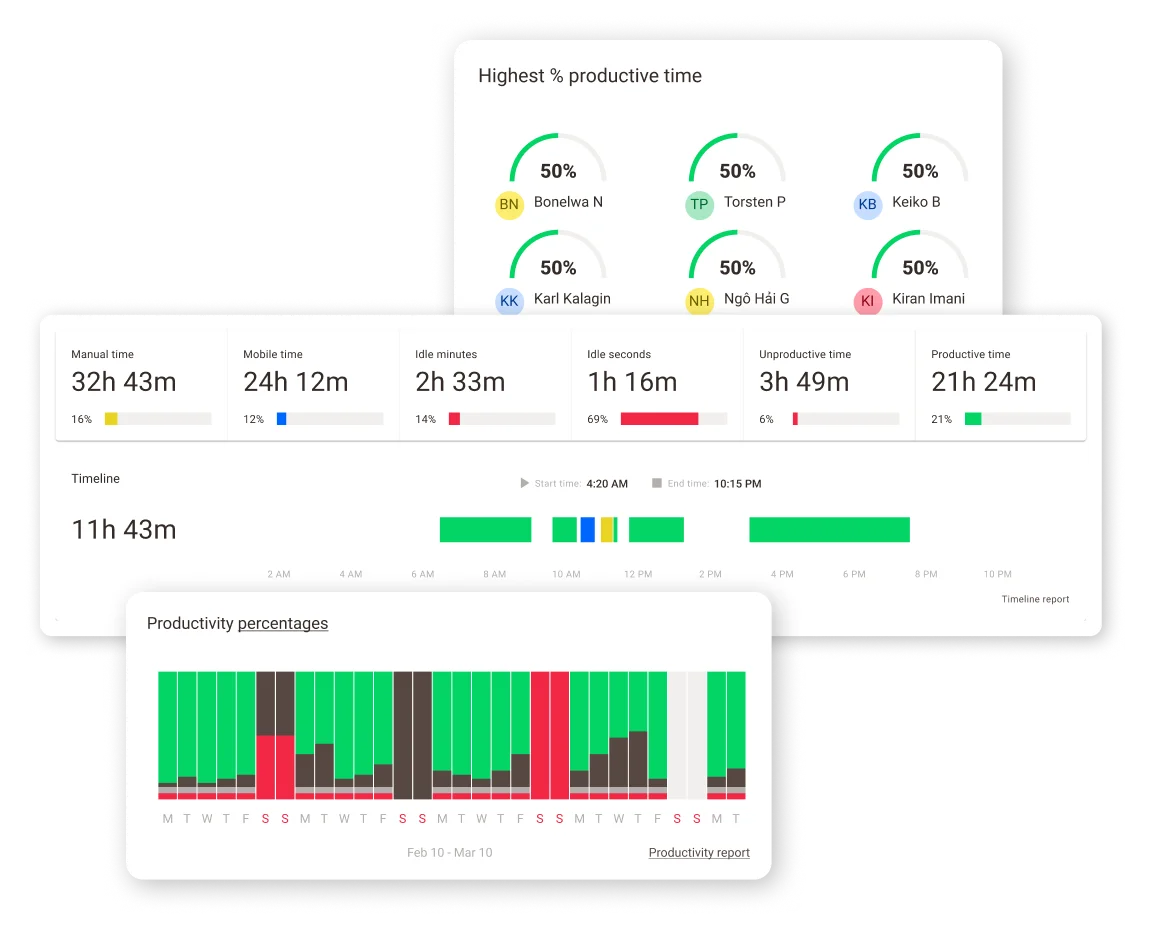
Time Doctor platform dashboard

About Time Doctor

Industry leader in connected fleet operations

Market Position

Established mid-market employee monitoring and time tracking vendor with a strong base among BPOs, agencies and distributed teams.

Innovation Focus

AI productivity benchmarks, unusual activity detection, mouse jiggler detection and office vs. remote reporting on the Premium tier.

Core Strengths

Automatic time tracking, activity and web/app usage reporting, payroll exports and 24/7 chat and email support on Standard and above.

Use Cases

Remote workforce oversight, BPO and call center productivity, client billing, attendance and payroll preparation.

Discover Time Doctor’s Complete Employee Monitoring Suite

Core Products & Solutions

Tracking, analytics and payroll tools that connect time data to output
Automatic Time And Activity Tracking

Automatic Time And Activity Tracking

Desktop and mobile apps record work time automatically or by task, with active and idle time measured through keyboard and mouse activity. Online and offline tracking keeps records intact when connectivity drops.

Screenshots And Screen Recording

Screenshots And Screen Recording

Periodic screenshots are available on every plan, with blur options and time-window restrictions for privacy. Video screen recording is included in Premium or sold as a per-user add-on.

Web And App Usage With Productivity Ratings

Web And App Usage With Productivity Ratings

Standard and above classify websites and applications as productive or unproductive and roll that data into activity summaries. Managers can tune ratings by team or role.

Attendance, Schedules And Leave

Attendance, Schedules And Leave

Schedules, attendance tracking, break tracking and leave management sit in the Standard tier, along with time approvals before hours are finalized.

Payroll And Integrations

Payroll And Integrations

Approved timesheets can be paid through connections such as PayPal, Payoneer, Wise, Rippling and Xero, with custom pay periods and multiple currencies. Standard and above connect to 60+ tools including project management and CRM apps.

Executive Dashboard And AI Insights

Executive Dashboard And AI Insights

Premium adds an executive dashboard, Benchmarks AI, unusual activity reports, irregular keyboard and mouse jiggler detection, internet connectivity tracking, SSO and open API access, with two years of data retention.

Time Doctor’s Pricing Plans

Pricing Overview

Published per-user pricing; annual billing includes two free months, and Enterprise is quote-based

Basic

Small teams that need core time tracking and screenshots

$6.70/user/mo

$6.70/user/mo billed annually ($8/user/mo monthly)

  • Automatic time tracking
  • Projects and tasks
  • Timeline report
  • Screenshots with blur options
  • Online and offline tracking
  • Ticket portal and knowledge base support only, 3 months of data history
Custom Quote
Get A Quote

Standard

Growing teams that need productivity analytics, payroll and live support

$11.70/user/mo

$11.70/user/mo billed annually ($14/user/mo monthly)

  • Everything in Basic
  • Web and app usage with productivity ratings
  • Schedules, attendance, leave and break tracking
  • Payroll and time approvals
  • 60+ integrations and real-time notifications
  • Live chat, email and callback support, 6 months of data history
Custom Quote
Get A Quote

Premium

Larger or compliance-focused teams that want AI insights and a dedicated contact

$16.70/user/mo

$16.70/user/mo billed annually ($20/user/mo monthly)

  • Everything in Standard
  • Video screen recording and executive dashboard
  • Benchmarks AI and unusual activity reports
  • Mouse jiggler, clicker and irregular keyboard detection
  • SSO, open API, automatic user provisioning and client login access
  • Dedicated success manager (50+ users) and 2 years of data history
Custom Quote
Get A Quote
WHO

Who Is Time Doctor Best For?

Ideal customer segments and business profiles

Small Businesses

1-25 Employees

Small teams get low entry pricing and fast setup, but Basic has no integrations or live support, so most will need Standard to benefit from the support model this page evaluates.

Mid-Market Companies

26-100 Employees

The strongest fit: Standard or Premium delivers productivity analytics, payroll, 24/7 chat and email support and, above 50 Premium users, a dedicated success manager.

Enterprise Companies

100+ Employees

Premium and Enterprise add SSO, automatic provisioning, open API, private cloud deployment and custom BI dashboards, though larger buyers should confirm SLA terms in writing.

BPOs And Outsourced Support Teams

Any Size

Call centers, virtual assistant firms and offshore teams make up a large share of published case studies, with client login access and international payouts suited to that model.


Time Doctor’s benefits

Measurable Impact & Benefits

Figures from Time Doctor’s published case studies and company data; results are vendor-reported

85%

Efficiency Increase

Reported by Dentistry Support after rolling out Time Doctor

35%

Project Efficiency Gain

SmartSites web development team case study

30%

Productivity Boost

Eufonie customer contact operation case study

25%

Productivity Boost

Leading customer support BPO case study

$1M

Saved

US health insurance company case study

10,000+

Companies

Customer companies Time Doctor reports using the platform

280,000

Active Users

Active user count stated on Time Doctor's company page

60+

Integrations

Third-party tools available on Standard plans and above

Time Doctor’s REVIEWS

Time Doctor Real reviews

Strong scores on business software review sites, with a sharply negative Trustpilot profile driven by billing complaints

Our Rating:

4.5/5

Trustpilot reviews
1.3
G2 reviews
4.4
497 Reviews
Capterra
4.5
548 Reviews
2.4
161 Reviews
Bhava L.
Clean, Feature Rich Time Tracking with Great Support
Lizzie B.
The best time tracking tool I have used so far
Employee Monitoring Checklist

Employee Monitoring Buyer's Checklist

See how Time Doctor stacks up against competitors

Monitoring tools differ widely in what they capture, which plan unlocks live support, and how much control employees have over their own data. This checklist helps you compare tracking depth, privacy settings, support coverage and true per-user cost before you sign.

Get Your Free Checklist

Enter your email to download instantly

No spam. Instant access. Unsubscribe anytime.

Instant
Download
No
Spam
Free
Forever
Time Doctor BENEFITS

Time Doctor’s Pros & Cons

Balanced evaluation to help you make an informed decision

Strengths

  • 24/7 live chat and email support on Standard and Premium, with callback option
  • Dedicated success manager for Premium accounts of 50+ users
  • Transparent published pricing with a 14-day Premium trial and no card required
  • Customer service rated 4.4 out of 5 on Capterra across 548 reviews
  • Built-in payroll payouts through PayPal, Payoneer, Wise and other providers
  • ISO 27001 certification and SOC 2 compliance, with HIPAA and GDPR support
  • Privacy controls such as screenshot blur and tracking limited to clocked time

Limitations

  • Trustpilot rating of 1.3 out of 5 with repeated complaints about cancellation and refunds
  • Basic plan has no live support and no third-party integrations
  • Add-ons can raise costs quickly, and stacking them may exceed Premium pricing
  • Some reviewers report multi-day reply times and templated responses
  • Screenshot and keystroke-based monitoring raises employee privacy and consent obligations
  • Reported glitches on remote desktop sessions and performance lag on low-powered machines

Our Verdict

Time Doctor earns its Best in Support placement on the strength of round-the-clock chat and email support on Standard and Premium, a dedicated success manager for larger Premium accounts, and customer service ratings of 4.4 out of 5 on Capterra and G2 reviews that repeatedly mention helpful support. Combined with published pricing from $6.70 per user and a no-card Premium trial, it is a practical choice for mid-market teams, BPOs and distributed workforces that want monitoring plus reliable help when something breaks. That verdict comes with real qualifications. Basic-plan customers get only tickets and a knowledge base, Trustpilot reviewers rate the company 1.3 out of 5 largely over billing and cancellation experiences, and some Capterra users cite slow replies. Buyers should budget for Standard at minimum, confirm cancellation and refund terms in writing, and configure screenshots and activity tracking with clear employee notice to stay on the right side of privacy rules.

Resources

Resources & Documentation

Detailed materials for deeper evaluation

Pricing Plans Page

Current per-user rates, plan comparison and trial terms

Pricing Plans And Features Guide

Help center breakdown of annual vs. monthly rates, support by plan, add-ons and data retention

Security And Compliance Overview

Encryption, ISO 27001, SOC 2, backups and privacy safeguards

ISO 27001 Certification

Details of Time Doctor's information security certification

Payroll Feature Overview

How tracked hours flow to PayPal, Payoneer, Wise, Rippling and Xero

Case Studies Hub

Customer stories from BPOs, agencies, healthcare support and ecommerce firms

Support Help Center

Knowledge base and ticket portal for setup and troubleshooting

Contact And Support Page

Sales, support and partner contact options, including 24/7 support access

What to Know

What to Know Before Buying

Key considerations for evaluating Time Doctor
  • 14-day Premium trial lets you configure settings before paying
  • Productivity ratings and screenshot policies need upfront decisions by role
  • Employee communication and consent steps should be completed before rollout
  • Open API access and automatic user provisioning are Premium features.
  • Data retention ranges from 3 months on Basic to 2 years on Premium.
  • Monthly billing costs roughly 20% more than annual.
  • Payroll mappings and project structures must be rebuilt.
  • Given Trustpilot complaints about cancellations and refunds, review the refund policy before prepaying for a year.

Alternatives

Compare Alternatives

See how Time Doctor stacks up against competitors

Both track time with screenshots and pay contractors; Hubstaff adds GPS and field team features while Time Doctor leans on deeper productivity analytics and 24/7 support.

ActivTrak focuses on screenshot-free productivity analytics with a free tier, while Time Doctor combines time tracking, screenshots and payroll in one tool.

Get Started

Ready to Get Started?

Get personalized recommendations from top 3 vendors

By submitting, you agree to receive recommendations from verified vendors. No spam, unsubscribe anytime.

Are You a Software Vendor?

List your company and get in front of decision-makers actively searching for solutions.

FAQ’s

Frequently Asked Questions

Common questions about Time Doctor

Basic is $6.70, Standard $11.70 and Premium $16.70 per user per month on annual billing, or $8, $14 and $20 month-to-month. Enterprise is quote-based, and add-ons are extra.

Basic includes the knowledge base and ticket portal. Standard and Premium add 24/7 live chat, email and callback support, and Premium accounts with 50 or more users receive a dedicated success manager.

Yes, screenshots are available on all plans, with blur and time-window settings to limit sensitive content. Video screen recording is included in Premium or available as an add-on.

Tracking is tied to clocked work time, and interactive mode pauses monitoring during breaks. Employers are still responsible for configuring it proportionately and informing staff.

Basic lacks integrations and live support, add-ons raise costs, some users report slow replies and glitches, and Trustpilot reviewers flag billing and cancellation problems.

Time Doctor holds ISO 27001 certification, maintains SOC 2 compliance, encrypts data in transit and at rest, and supports GDPR and HIPAA requirements.

Standard and above include payroll, letting you approve timesheets and pay through PayPal, Payoneer, Wise, Rippling or Xero with custom pay periods and currencies.

Common alternatives include Hubstaff, ActivTrak, Insightful, Teramind and DeskTime, which differ on screenshot use, pricing and field-team features.


