




Deputy logo

Verified Clock-Ins, Live Attendance And Break Compliance For Hourly Teams

Deputy tracks attendance for shift-based US businesses through a mobile time clock with GPS geofencing, a tablet kiosk with facial recognition, and live views of who is on shift, late or on break. Late clock-in alerts, missed break flags and employee attestation feed directly into compliance-ready timesheets.
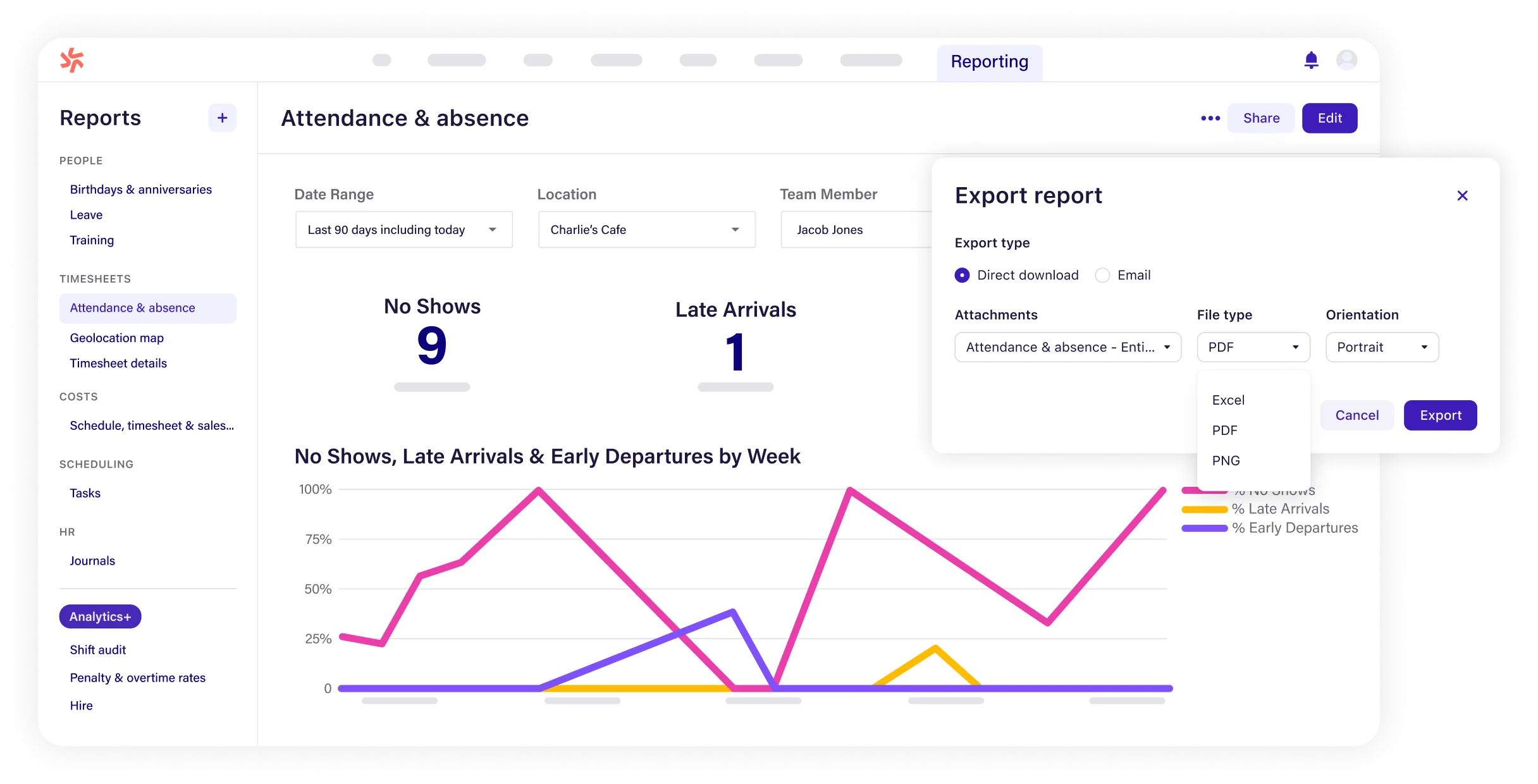
Deputy platform dashboard

About Deputy

Industry leader in connected fleet operations

Market Position

Long-standing time and attendance vendor for hourly workforces, with 1 billion+ shifts scheduled on its platform

Innovation Focus

Touchless facial recognition kiosks, geofenced mobile clocking, active attestation and Deputy AI

Core Strengths

Multiple verified clock-in methods, real-time attendance visibility, break and overtime alerts, US labor law tooling

Use Cases

Retail stores, restaurants and cafes, healthcare clinics, fitness studios, warehouses and multi-site franchise operators .

Discover Deputy’s Complete Attendance Suite

Core Products & Solutions

Capture who worked, where and when, then flag every exception against the schedule
Deputy Kiosk With Facial Recognition

Deputy Kiosk With Facial Recognition

The Kiosk app for iPad and the Time Clock app for Android tablets let staff start and end shifts with touchless facial recognition, which helps curb buddy punching on shared devices. The iPad kiosk stores up to 24 hours of activity offline and supports nine languages.

Mobile Time Clock With GPS Geofencing

Mobile Time Clock With GPS Geofencing

Employees clock in from their phones with a GPS location stamp checked against the workplace address. Admins set a radius between 100 and 1,000 yards and choose either to block out-of-range clock-ins or to let them through and alert a manager.

Real-Time Attendance Dashboard

Real-Time Attendance Dashboard

Managers see who is on shift, who is running late and who is on break across locations as it happens. Scheduled versus actual reports make it easy to filter for employees who did not show up for a rostered shift.

Late Clock-In And Missed Clock-Out Alerts

Late Clock-In And Missed Clock-Out Alerts

Configurable notifications fire when a worker has not clocked on a set number of minutes after shift start, or has not clocked off after shift end. Alerts can go to the employee, the manager or both, and specific areas can be excluded.

Break Management And Active Attestation

Break Management And Active Attestation

Deputy schedules meal and rest breaks, flags missed breaks and records waivers. It automatically asks staff to attest when they clock in late, work unscheduled time, miss a break or leave early, creating a record for disputes and audits.

Labor Law Compliance Controls

Labor Law Compliance Controls

A pre-built pay rule library, overtime risk alerts, minor work-hour guardrails and Fair Workweek support for Los Angeles, New York, Chicago and Philadelphia sit on top of attendance data. Shift notes log every change for audit-ready digital records.

Deputy’s Pricing Plans

Pricing Overview

Published per-user pricing at the annual rate (monthly billing runs about 10% higher); a $30 minimum monthly spend applies and time clocking is included on every plan

Lite

Small teams that need verified clock-ins and basic attendance records

$5/user/mo

$5/user/mo billed annually (about $5.50 billed monthly)

  • Basic time clocking on mobile, web and kiosk
  • Basic timesheets
  • Basic scheduling
  • Labor compliance tools
  • Shift management and swapping
  • Deputy AI at introductory no-cost terms
Custom Quote
Get A Quote

Core

Growing operators that want attendance tied to smarter scheduling

$6.50/user/mo

$6.50/user/mo billed annually (about $7.25 billed monthly)

  • Everything in Lite
  • Advanced scheduling
  • Auto-scheduling
  • Demand forecasting
  • Customer success manager
  • Deputy AI at introductory no-cost terms
Custom Quote
Get A Quote

Pro

Multi-location and enterprise employers that need tighter controls

$9/user/mo

$9/user/mo billed annually (about $10 billed monthly); custom enterprise pricing on request

  • Everything in Core
  • Advanced timesheets
  • Custom access levels
  • Single sign-on (SSO)
  • Analytics+ attendance reporting and Messaging+ included
  • Dedicated customer success manager and 24/7 live chat
Custom Quote
Get A Quote
WHO

Who Is Deputy Best For?

Ideal customer segments and business profiles

Small Businesses

1-25 Employees

A single cafe, salon or clinic can replace paper sign-in sheets with a geofenced phone clock or one shared kiosk on the Lite plan. Teams under six users will pay the $30 monthly minimum rather than the per-user rate.

Mid-Market Companies

26-100 Employees

Growing operators get late clock-in alerts, break flags and scheduled versus actual reporting, and Core adds auto-scheduling so attendance gaps can be covered faster.

Enterprise Companies

100+ Employees

Pro adds SSO, custom access levels and Analytics+ for attendance trends across many sites, with custom enterprise terms available for large hourly workforces.

Employers With Strict Break And Scheduling Rules

Any Size

Businesses in California-style meal and rest break regimes or Fair Workweek cities gain the most from attestation prompts, missed break premium flags and audit trails.


Deputy’s benefits

Measurable Impact & Benefits

Figures from Deputy product pages, help documentation, press releases and published case studies

1

Billion+ Shifts Scheduled

Cumulative platform milestone Deputy announced in March 2026

1.5

Million Shift Workers

Hourly employees using Deputy worldwide, per 2026 company releases

385,000+

Workplaces

Company-reported customer workplaces across 100+ countries

24 Hours

Of Offline Kiosk Storage

The iPad kiosk keeps clock activity during internet outages and syncs later

100

To 1,000 Yard Geofence Radius

Configurable range for blocking or flagging mobile clock-ins away from site

4

Fair Workweek Cities Supported

Los Angeles, New York, Chicago and Philadelphia predictive scheduling rules

85%

Fewer Staffing Closures

Mud Bay cut staffing-related store closures from 72 incidents to 11

9

Kiosk Languages

Multilingual clock-in screens for diverse frontline teams

Deputy’s REVIEWS

Deputy Real reviews

Rated by hourly teams that clock in daily across retail, hospitality, healthcare and services

Our Rating:

4.6/5

Trustpilot reviews
2.9
G2 reviews
4.6
666 Reviews
Capterra
4.6
773 Reviews
2.7
134 Reviews
Angelica F.
I really liked how easy it was to clock in and out
Jesse F.
Easy Daily Timecard Management
Attendance Software Buyer’s Checklist

Attendance Checklist

What To Compare Before You Buy

Attendance tools differ most in how they verify identity and location, how quickly they flag late arrivals and no-shows, and how well they enforce break rules in your states and cities. This checklist helps you compare clock-in methods, alert options, offline behavior and compliance depth before you sign.

Get Your Free Checklist

Enter your email to download instantly

No spam. Instant access. Unsubscribe anytime.

Instant
Download
No
Spam
Free
Forever
Deputy BENEFITS

Deputy’s Pros & Cons

Balanced evaluation to help you make an informed decision

Strengths

  • Touchless facial recognition on iPad and Android kiosks helps prevent buddy punching
  • Geofencing can either block out-of-range clock-ins or simply alert managers
  • Live view of who is on shift, late or on break across all locations
  • Configurable late clock-in and missed clock-out notifications for staff and managers
  • Active attestation captures employee confirmation for late starts, missed breaks and early exits
  • US labor tooling covers breaks, overtime, minors and Fair Workweek cities
  • Attendance capture included from the $5 per user entry plan

Limitations

  • Geofencing does not apply to kiosk or desktop web clock-ins, and GPS is only captured at punch time
  • The mobile app cannot clock in without connectivity; only the iPad kiosk stores offline activity
  • Deputy's help documentation describes late clock-in alerts rather than a dedicated no-show notification
  • Analytics+ attendance reporting costs extra below the Pro plan
  • Kiosk facial recognition needs a supported tablet at each site
  • Trustpilot reviewers report support delays and some location-based clock-in failures

Our Verdict

Deputy earns its Best in Features placement for attendance by covering the full chain from verified clock-in to documented exception. Facial recognition kiosks, geofenced mobile punches, a real-time dashboard, late clock-in alerts and active attestation for late starts, missed breaks and early departures give managers more attendance controls than most low-cost scheduling tools. Its US labor rules for breaks, overtime, minors and Fair Workweek cities, published pricing from $5 to $9 per user per month on annual billing and 4.6 ratings on G2, Capterra and Software Advice make it a strong shortlist candidate for hourly employers. The gaps are practical rather than fundamental. Mobile clocking needs a connection, geofencing does not cover kiosks, no-show tracking relies on late alerts and scheduled versus actual reports rather than a dedicated alert, and deeper attendance analytics sit in a paid add-on or the Pro plan. Trustpilot feedback on support and clock-in reliability is worth testing directly: run a pilot at one location with your real break rules and geofence settings before rolling out company-wide.

Resources

Resources & Documentation

Detailed materials for deeper evaluation

Time And Attendance Overview

Deputy's attendance tracking, break management and reporting features

Employee Time Clock App

Facial recognition, GPS stamps, offline kiosk and attestation details

Help Center: Enable Geofence In Deputy

How to set radius limits and choose blocking or manager alerts

Help Center: Clock On And Off Notifications

Configuring late clock-in and missed clock-out alerts

Labor Law Compliance Overview

Break rules, attestation, minor limits, overtime alerts and audit records

Fair Workweek Compliance Software

Predictive scheduling support for covered US cities

Deputy Kiosk App

iPad time clock app listing on the Apple App Store

Deputy Pricing Page

Current plans, per-user rates, add-ons and billing minimums

What to Know

What to Know Before Buying

Key considerations for evaluating Deputy
  • Set geofence radius and enforcement mode for each workplace address
  • Configure break, overtime and attestation rules to match each state and city
  • Enroll employee faces and deploy tablets if you use kiosk facial recognition
  • Test that break premiums and overtime codes map correctly before go-live.
  • Per-user pricing scales linearly, including seasonal hires who clock in only a few weeks a year.
  • The $30 minimum monthly spend also applies to very small teams.
  • Run Deputy alongside your old method for one pay period to compare attendance and hours.
  • Enterprise buyers can negotiate custom terms through Deputy sales.

Alternatives

Compare Alternatives

See how Deputy stacks up against competitors

Homebase offers a free single-location time clock; compare it with Deputy's facial recognition kiosk, attestation workflows and Fair Workweek tooling.

Detailed feature comparison, pricing analysis, and user reviews

Get Started

Ready to Get Started?

Get personalized recommendations from top 3 vendors

By submitting, you agree to receive recommendations from verified vendors. No spam, unsubscribe anytime.

Are You a Software Vendor?

List your company and get in front of decision-makers actively searching for solutions.

FAQ’s

Frequently Asked Questions

Common questions about Deputy

Yes. Touchless facial recognition is available on the Deputy Kiosk app for iPad and the Time Clock app for Android tablets, letting employees start and end shifts on a shared device while reducing buddy punching.

Deputy checks the GPS location of mobile clock-ins against the workplace address within a radius of 100 to 1,000 yards. Admins can block clock-ins outside the radius or allow them and notify a manager; geofencing does not apply to kiosk or desktop clock-ins.

Deputy sends configurable late clock-on alerts after a set number of minutes to the employee, manager or both, plus missed clock-off alerts. Its real-time dashboard and scheduled versus actual reports identify no-shows, though help documentation does not describe a separate no-show alert.

It schedules required breaks, flags missed breaks, records waivers and can flag missed break premium pay on timesheets. Active attestation asks staff to confirm the reason when they miss a break or clock in late.

The Deputy Kiosk for iPad can store up to 24 hours of clock activity offline and sync later. The mobile app requires a connection to clock in, according to third-party reviewers.

Time clocking and labor compliance tools are included on all plans: Lite at $5, Core at $6.50 and Pro at $9 per user per month on annual billing, with a $30 minimum monthly spend. Analytics+ reporting is $1.50 per user unless included on Pro.

Common alternatives for hourly attendance tracking include Homebase, Connecteam, When I Work, 7shifts and Jibble, which differ in free tiers, biometric options and compliance depth.

Deputy supports US federal, state and local requirements including overtime and premium pay rules, meal and rest breaks, minor work-hour limits and Fair Workweek scheduling in Los Angeles, New York, Chicago and Philadelphia.


